
Download Coolcut – Free Video Editor & Screen Capture Tool for Windows, Mac, Android, iOS
Coolcut is a powerful, all-in-one video editing and screen recording software designed for creators, educators, and professionals who need a reliable, free tool to produce high-quality videos and recordings. Whether you're creating online tutorials, capturing gameplay, recording business meetings, or editing personal videos, Coolcut delivers a seamless experience with its intuitive timeline-based interface. With advanced features like multi-track editing, real-time effects, customizable transitions, audio mixing, watermarking, and high-definition screen capture, Coolcut stands out as a top free alternative to premium software.
The tool supports multiple formats and offers smooth performance across Windows, Mac, Android, and iOS devices, making it a truly cross-platform solution. No hidden fees, no watermarks on exports — just pure, secure, and feature-rich video creation. Download Coolcut today and unlock the full potential of your content creation workflow.
Key Features of Coolcut – Powerful Video Editing & Screen Recording
One of the main reasons Coolcut has gained popularity among users worldwide is its comprehensive set of features, all available at no cost. The software combines two essential tools — a professional video editor and a high-precision screen capture utility — into a single, cohesive application. At its core, Coolcut offers a timeline-based editing workspace that makes organizing clips, audio, transitions, and effects intuitive and efficient. Users can easily drag and drop media files, trim clips with precision, and layer multiple video and audio tracks for complex compositions.
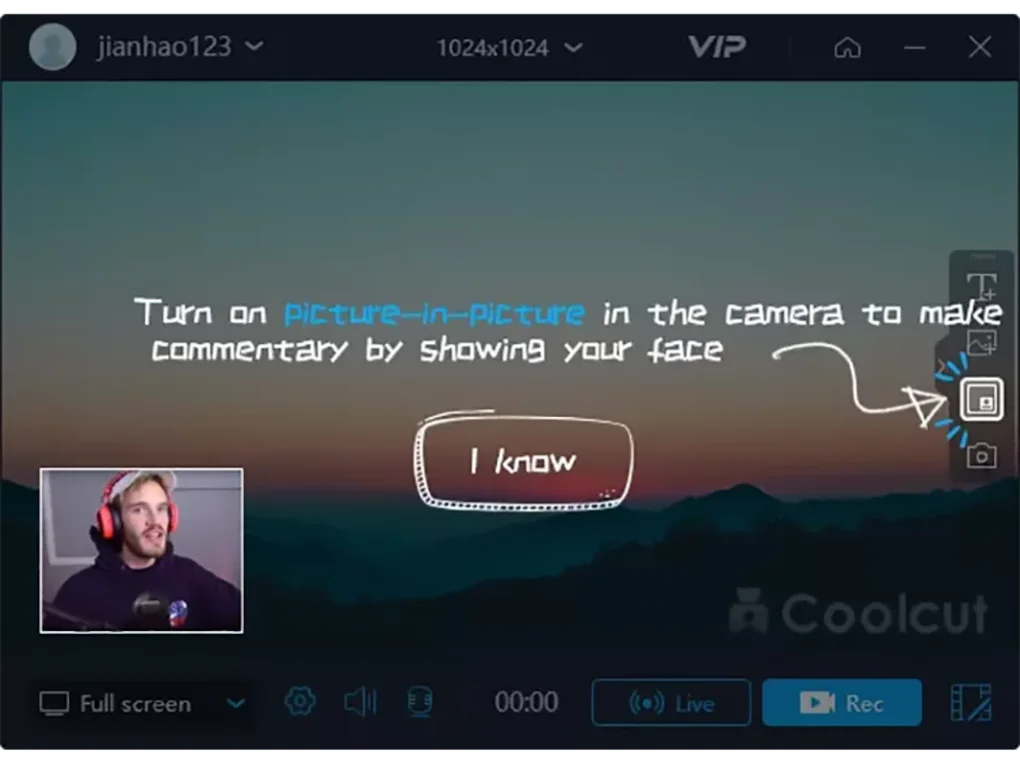
The screen recording function is particularly impressive. With support for full-screen, region-specific, and window-based recording, users can capture exactly what they need — whether it’s a live presentation, software demo, or gaming session. The recording quality is sharp and smooth, even at high frame rates, ensuring that every detail is preserved. Additionally, Coolcut allows real-time audio capture from the system or microphone, enabling seamless narration during recordings. You can also enable webcam overlay for face-to-camera tutorials, making your content more engaging.
For video editing, Coolcut provides a rich library of transitions, filters, and visual effects. From fade-ins and zooms to glitch effects and color grading tools, the options are extensive. You can add background music, adjust volume levels, apply fade effects, and even insert custom watermarks to protect your content. The software also supports exporting in popular formats like MP4, AVI, MOV, and WMV, ensuring compatibility with most devices and platforms. All features are accessible without a steep learning curve, making Coolcut ideal for beginners and intermediate users alike.
- Timeline-based video editing with multi-track support
- High-quality screen recording (full-screen, region, window)
- Real-time audio capture from mic or system audio
- Webcam overlay for face-to-camera tutorials
- Extensive library of transitions, filters, and visual effects
- Multi-track audio mixing with volume control
- Watermark insertion for branding and copyright protection
- Export in MP4, AVI, MOV, WMV, and more
- Free to download and use with no hidden fees
- Secure, ad-free interface with no data collection
How to Install and Use Coolcut on Windows, Mac, Android, and iOS
Getting started with Coolcut is simple and fast, regardless of your device. The software is available for Windows (7 and later), Mac (10.14 or higher), Android (5.0+), and iOS (12.0+). To begin, visit the official Coolcut website and download the appropriate version for your operating system. The installer is lightweight, typically under 100MB, and installs in under a minute with minimal system impact. Once installed, launch the app and you’ll be greeted with a clean, modern interface that organizes all tools into easy-to-navigate panels.
For screen recording, click the “Record” button and choose your recording mode: full screen, specific window, or custom region. You can also select audio sources — system sound, microphone, or both — and adjust settings like frame rate and resolution before starting. During recording, a small overlay shows the countdown and recording status. When finished, the recording is automatically imported into the timeline for editing.
Editing is where Coolcut truly shines. Drag your video clips, audio files, or screenshots into the timeline. Use the trimming tool to cut out unwanted parts, apply transitions between clips, and enhance visuals with filters.
You can add background music from your library or use built-in royalty-free tracks. The watermark tool allows you to add logos or text that appear throughout the video. Once satisfied, click “Export” and choose your desired format, resolution, and quality.
The export process is fast and efficient, even for large files.
For mobile users, the Coolcut app offers a streamlined version of the desktop experience. While some advanced features are limited, the core functions — screen recording, basic trimming, and simple effects — work smoothly on smartphones and tablets. This makes it perfect for on-the-go content creation, such as quick tutorials or social media videos.
Compatibility & System Requirements
Coolcut is designed to be accessible across a wide range of devices and operating systems, ensuring that users from different tech backgrounds can benefit from its powerful tools. The desktop version is fully compatible with Windows 7 and later, including Windows 10 and Windows 11. For Mac users, Coolcut runs on macOS 10.14 (Mojave) and newer, including Apple Silicon (M1/M2) Macs, ensuring smooth performance and native support for Apple’s latest hardware.
On mobile platforms, Coolcut is available as a free app on both the Google Play Store and Apple App Store. The Android version requires Android 5.0 or higher, while the iOS version supports devices running iOS 12.0 and above. The mobile app is optimized for touch controls and offers a simplified interface that focuses on essential editing and recording tasks.
System requirements are modest, making Coolcut suitable for older or budget devices. On Windows and Mac, you’ll need at least 2GB of RAM, 500MB of free disk space, and a modern graphics card for smooth playback. For screen recording, a stable internet connection is recommended for updates and access to cloud features, though the core functionality works offline. The software does not require a subscription or account to use — just download, install, and start creating.
Coolcut’s cross-platform nature means you can start a project on your desktop and continue editing on your tablet or phone, making it a flexible choice for creators who work across devices. Whether you're a student, teacher, content creator, or business professional, Coolcut adapts to your workflow without compromising performance or features.
Pros and Cons of Coolcut – Honest Review
After extensive testing, Coolcut proves to be one of the most compelling free video editing and screen recording tools on the market. Its strengths far outweigh its minor limitations, making it a top recommendation for users seeking a no-cost, powerful solution.
Pros:
- 100% Free with No Hidden Costs – Unlike many free tools that limit features or add watermarks, Coolcut offers full functionality at no charge.
- Professional-Grade Features – Multi-track editing, real-time effects, and high-quality recording rival paid software like Camtasia and ScreenFlow.
- User-Friendly Interface – The timeline-based design is intuitive, even for beginners, with clear icons and logical workflows.
- High-Quality Output – Supports 1080p and 4K recording and export, with minimal compression loss.
- Cross-Platform Support – Available on Windows, Mac, Android, and iOS, allowing seamless project continuity.
- Secure & Ad-Free – No third-party ads, pop-ups, or data tracking — your privacy is respected.
Cons:
- Limited Mobile Features – While the mobile app is functional, advanced editing tools are not available on smartphones or tablets.
- No Cloud Storage – Projects are saved locally; there’s no built-in cloud backup or sync option.
- Occasional Update Delays – Updates are released regularly, but sometimes lag behind new OS releases.
Conclusion: Why You Should Download Coolcut Today
If you’re looking for a secure, free, and feature-rich video editor and screen capture tool, Coolcut is an excellent choice. It combines powerful editing capabilities with high-quality recording in a single, easy-to-use application. Whether you're a teacher creating classroom videos, a developer documenting software features, or a content creator sharing tutorials on YouTube, Coolcut delivers professional results without the price tag.
With support for Windows, Mac, Android, and iOS, and a clean, intuitive interface, Coolcut is accessible to users of all skill levels. The absence of watermarks, ads, or subscriptions makes it one of the most trustworthy free tools available. Regular updates ensure compatibility and performance improvements, keeping the software fresh and reliable.
Don’t miss out on this powerful tool. Download Coolcut now and start creating high-impact videos and recordings with confidence. Whether you’re recording a presentation, editing a personal vlog, or capturing gameplay, Coolcut has everything you need — all for free.







